
The seven places a client's licence ends up
You took one copy. Your office kept seven.
 ·21 August 2026·About 6 minutes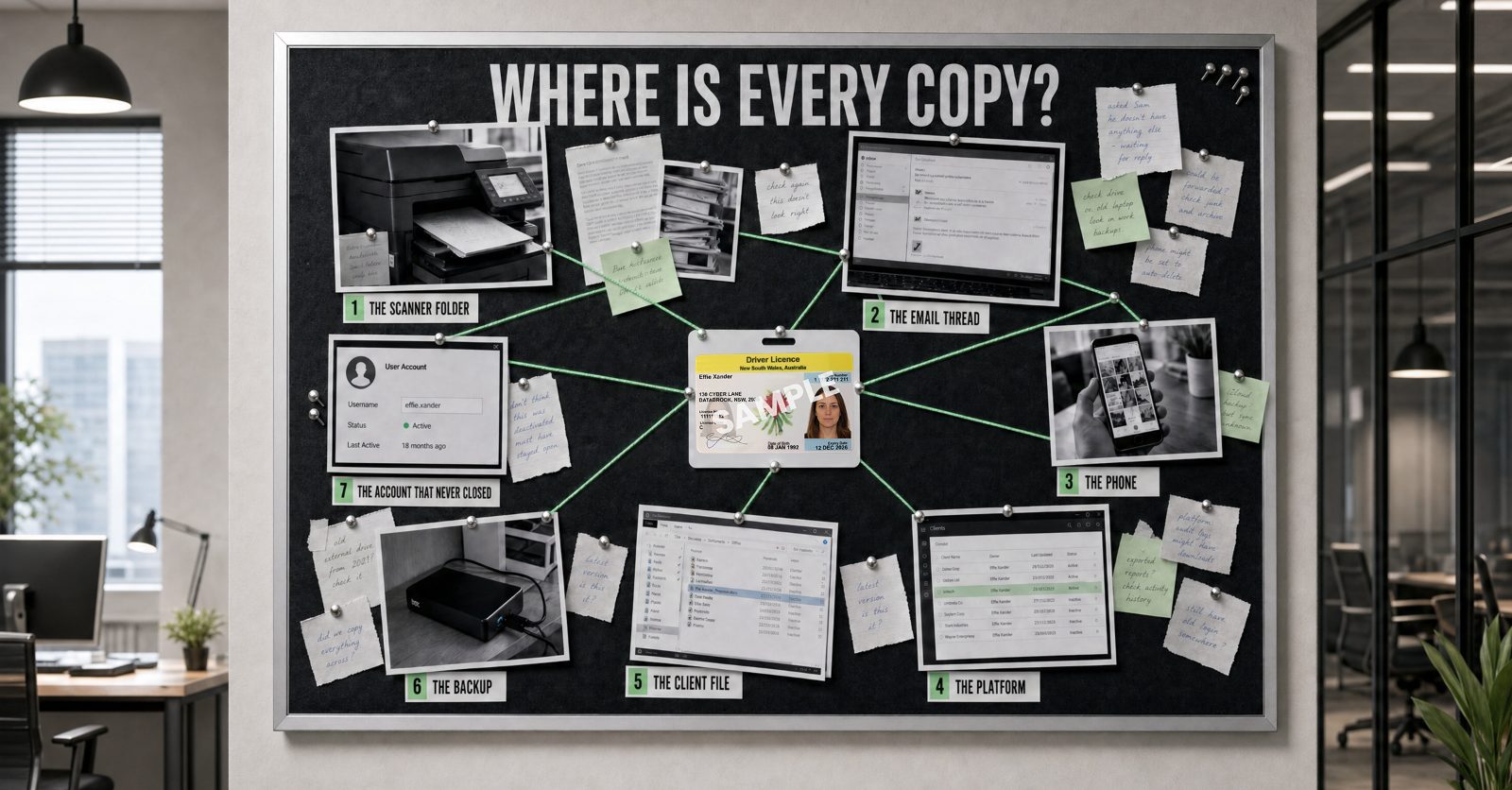
On a Tuesday morning a client emails your office a photograph of her driver's licence. She has taken it on her phone, at her kitchen bench, because your onboarding email asked for an identification document and this was the fastest way to do it.
You have done nothing wrong. She has done nothing wrong. Since the anti-money laundering reforms reached real estate, legal and accounting practices, collecting that document is exactly what a firm providing a designated service is supposed to do.
Now let's follow the document.
Where it goes
It arrives in a mailbox on Tuesday morning. Somebody opens it, and because the matter needs to move, the person who received it forwards it to the person handling the file. That is a second mailbox and a sent items folder. Somebody downloads the attachment to check it is legible, which leaves a copy in a downloads folder, they then save it into the client file, which is the copy everybody would name if you asked them where is the file.
By Tuesday afternoon a photograph that existed in one place at breakfast now exists in four or five places, and not one person in the office has made a decision they would regard as a decision.
That is the whole problem, and it is not a compliance problem. It is an everyday problem that we all experience.
The seven
Across the reviews we’ve run, the same seven places come up. Not all seven in every firm, but rarely fewer than four.
One. The scanner folder that nobody empties. When a client physically brings the document into the office rather than emailing it, somebody scans it, and the scanner sends it somewhere. In most firms we look at, that destination is a folder or a shared mailbox that has been filling since the device was installed.
Two. The email it arrived in, and the thread it grew into. Most people are comfortable sending identity documents this way. Research commissioned by the Customer Owned Banking Association, surveying 1,004 Australians in April 2025, found 40 per cent had emailed photos of their passports, driver's licences or ID cards from their personal email accounts. The document arrives in a mailbox and a thread commences.
And a thread doesn’t hold just one copy. Every forward leaves the attachment in another sent items folder and puts it in another inbox. Everyone who opens it properly leaves one in downloads. And the reply that says thanks, got it, still has the licence hanging off the bottom of it. Three people needing to see one document is more than three copies created, and nobody is counting.
Three. The phone that took the photo. Sometimes the client's, sometimes your own. A document that is photographed at a property inspection, at a settlement, or across a desk, lives in a camera roll, and camera rolls back themselves up to personal accounts that belong to employees, not the business.
Four. The platform your provider manages. The CRM, the verification tool, the onboarding portal. This is the copy most people feel comfortable with, and often they are right to, but the provider's obligation ends at their own database. It does not reach the copies made before the document gets to this point.
Five. The practice or agency management system. The client file. The copy someone deliberately made, and the one that was thought about, executed and known.
Six. The backup. Every copy above, preserved on a schedule, including the ones you have since deleted from the live system. Deleting something from the place you can see it does not delete it from the place you cannot. These records exist, can be accessed and breached.
Seven. The account of the person who left the business in April. Their mailbox, their drive, their access to the client folder. If nobody switched it off on the day they left, everything they could reach in March, they can still reach today.
This last one is not a small business problem. The Australian National Audit Office found 1,451 user accounts at the Department of Defence whose access had not been removed in line with requirements, and almost 2,000 instances where former employees and contractors had logged in and accessed data after they had left. Across the entities it audited in 2022 and 2023, 78 per cent had not put in place any monitoring to detect it. If Defence can lose track of who still has a key, anyone can.
The question that has already been asked of you
Here is the part most firms have not registered. The regulator is not waiting for you to think about this. It has already made it a duty.
The Office of the Australian Information Commissioner's guidance for reporting entities requires an "understanding of what kind(s) of personal information your entity holds and where that information is stored", and goes on: "you should also know what specific systems your entity uses, who has access to those systems and what privileges users have within those systems."
Where is it, and who can reach it? That is the documented standard from the OAIC.
So, if we take the licence that arrived on Tuesday and ask three questions about it.
- Where are all the copies right now, including the ones nobody made on purpose?
- Who in your firm could open each one this afternoon?
- What, if anything, will remove them when the matter closes?
If you can answer all three without going to look, you are in better shape than most firms we speak to.
Nobody asked you to keep it
Now the part that tends to change the conversation.
AUSTRAC's own record keeping guidance says it clearly: "you aren't required to make copies of identification documents provided as part of CDD. Instead, you must keep records of what you did to identify the customer and what information they provided."
The privacy regulator goes further and asks you not to. Its fact sheet on the lifecycle of an identity document states that the Act "does not require you to collect, use, disclose or hold copies of full ID documents", and suggests sighting the document and recording the relevant fields instead of asking for a full copy by email.
Australian Privacy Commissioner Carly Kind has been direct about why.
“One of the most significant risks to Australians' privacy is the unnecessary retention of ID documents, which are some of the most important pieces of personal information Australians possess. Holding onto copies of ID documents not only creates risks to individuals, it creates risks for businesses, which will be more exposed in the event of a data breach.”
— Carly Kind, Australian Privacy Commissioner
Which means the seven places are not a requirement anyone imposed on your firm. They are an exposure that no-one asked you to create.
What’s at stake
Australian organisations notified the OAIC of 1,205 data breaches in 2025, the highest number in any year since the scheme began. Identity information sits near the top of what is exposed in them. The OAIC defines it as information used to confirm a person's identity, such as a passport number, driver licence number or other government identifier, and in the most recent period for which it published the figure, the second half of 2023, identity information was involved in 63 per cent of all notified breaches.
Unlike a password, this is not something the person can simply change. ID Support NSW notes that a replaced birth or marriage certificate "will not mitigate the risk of misuse, as it will be reissued with the same registration number and issue date". Some of what sits in those seven places cannot be reissued and made safe, the security permanently disappears and the identity information can be used for criminal purposes.
This is the risk a client creates when she takes a photograph of her driver’s licence at her kitchen bench.
Where to start
Start with one document, not with the whole business. Take the last client you onboarded, and try to list every place their identity document is sitting right now. Search your own mailbox for the word 'licence', filter to attachments, and count what comes back. It takes about two minutes and most people are surprised.
To help, we have created a free checklist that sets out the things worth your attention. You will receive a findings report with your three highest priorities in order of impact, and something you can do right now. It is multiple choice and takes about three minutes to complete.
The checklist covers what sits in your systems, which is the part efex works on and can help with: finding the copies, controlling who can open them, and keeping the systems that hold them configured to keep people out and watched for the times somebody gets in. What your firm keeps, and why, stays with you and your compliance adviser.
Read the checklist explainer, or start the checklist.
Thirteen questions. About three minutes. No client files.
Or talk it through first. Thirty minutes, no obligation, with somebody who does this work every day.
These articles explain what the regulators have published and what it commonly means in practice. General information only, not legal or compliance advice.